Camp Amp app iconBonus playbook · From Viral in 24 Hours with AI

The 24-Hour AI App.

How I found an App Store gap, built a paid iOS app with AI, made the screens and listing, and submitted it for review, all in one evening.

I'm not a coder. I can't code. And I still built this in a day.

No coding experience needed to start. Just GPT, Codex, Xcode and an Apple Developer account.

Read the full playbook free below, or grab the printable PDF, prompts and checklist.

Built in public · One evening

From idea to submitted in 5 hours

  1. 01
    6:30pm
    Started brainstorming simple paid iOS app ideas
  2. 02
    7:15pm
    Found the caravan electric hook-up gap
  3. 03
    8:00pm
    Wrote the Codex build brief
  4. 04
    9:30pm
    First working version running in Xcode
  5. 05
    10:15pm
    App Store title, subtitle, keywords, description written
  6. 06
    11:00pm
    Screenshots generated
  7. 07
    11:45pm
    App submitted for review
Want the exact prompts, scripts and checklists to run this yourself?See the Codex Plugin →
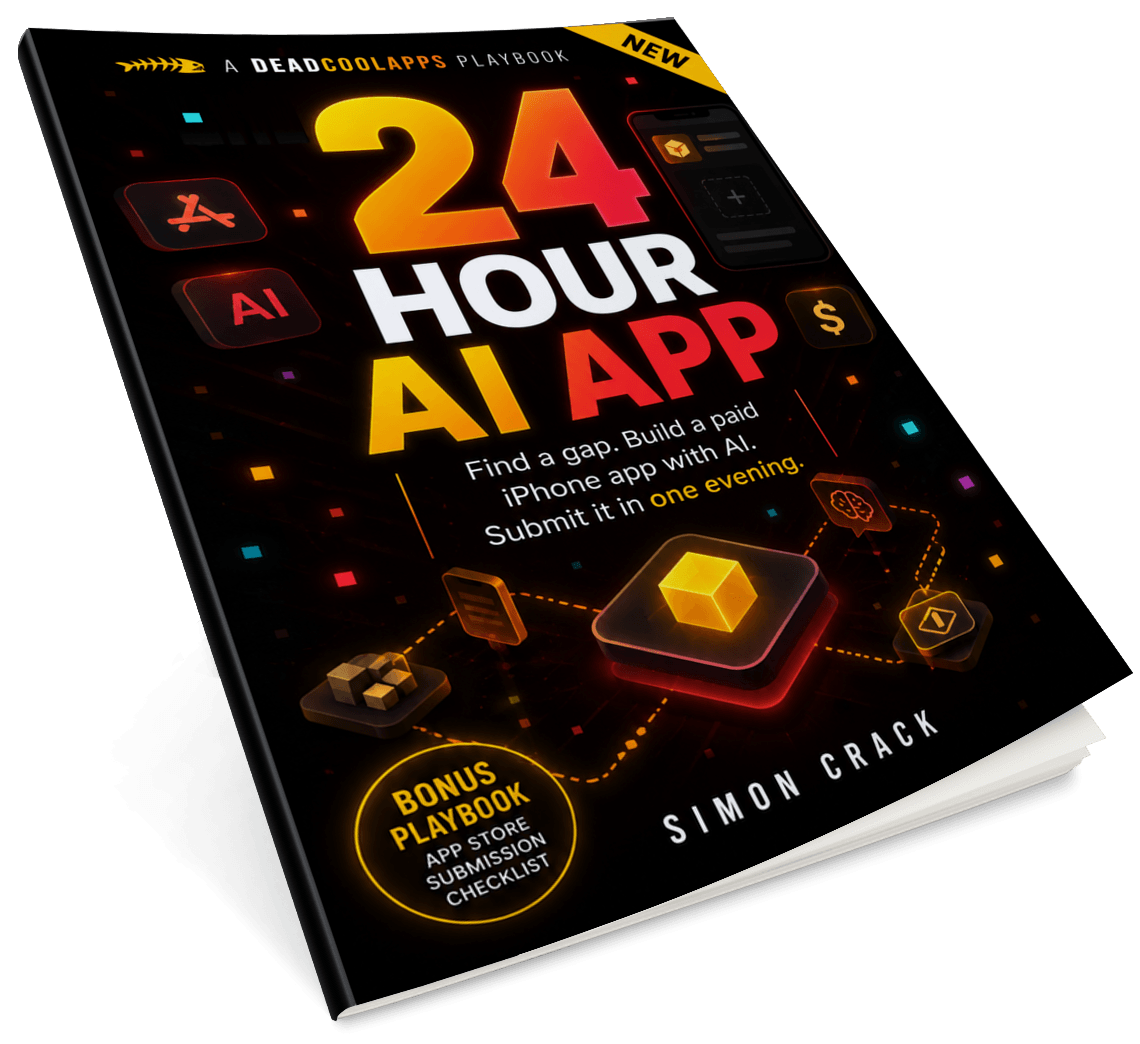
The 24-Hour AI App playbook PDF cover

Want the printable version?

Get the PDF, prompts and checklist at the end.

Jump to the Playbook
What you need
  • A Mac
  • Xcode
  • Codex / AI coding tool
  • GPT (for ideas, copy, assets)
  • Apple Developer account
  • One simple idea
What you don't
  • A team
  • A backend
  • A designer
  • A subscription model
  • Coding experience (to start)
The worked example

Meet Camp Amp

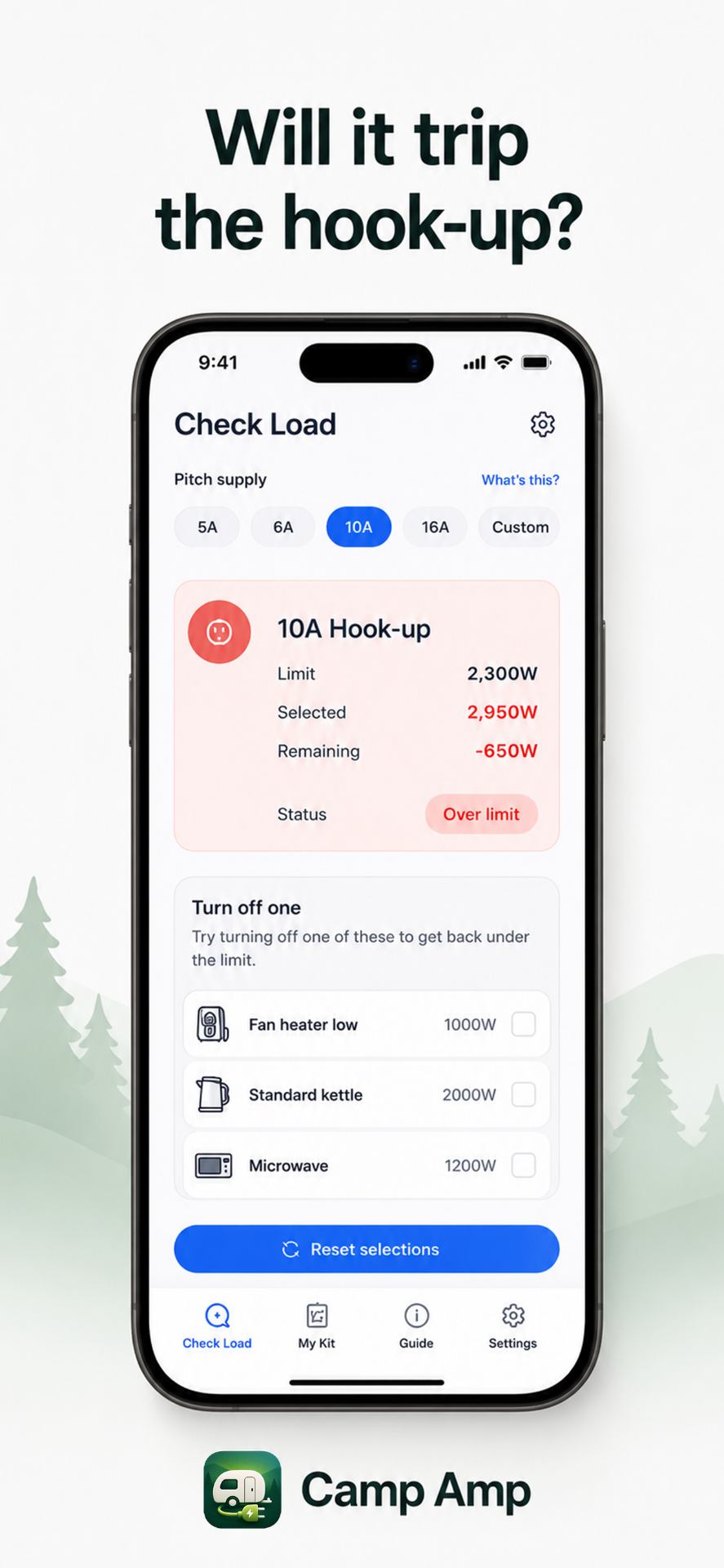
Throughout this playbook I use my own tiny paid iOS app, Camp Amp, as the worked example. It's a campsite electric hook-up calculator. Tap your pitch supply (5A / 6A / 10A / 16A), tap the appliances you want to run, and it tells you if you'll trip the hook-up.

I built and submitted it in one evening using the exact process below. Here's the 30-second intro:

Camp Amp app iconCamp Amp app screenshot · Will it trip the hook-up?
Want Codex to run this workflow with you?

Get the Codex Plugin

The Codex Plugin packs every prompt, script and checklist from this playbook into a one-command Codex skill. Drop it in, ship a paid iOS app in 24 hours.

See the Codex Plugin
The Playbook

Stop trying to build a unicorn

Read this first

If you think you need to know how to code, you don't.

I can't code. Not a line. AI writes it, Xcode runs it, you ship it. If you can describe what you want in plain English, you can do this.

Most app ideas fail before anyone opens Xcode. Not because the app is impossible. Because the idea is too big. What follows is the exact method I use to spot a tiny App Store gap, build a paid iOS app with AI, and ship it in a day.

Chapter 01

Stop trying to build a unicorn

Most app ideas fail before anyone opens Xcode. Not because the app is impossible. Because the idea is too big.

People say: “I want to build a habit tracker.” “I want to build a fitness app.” “I want to build a social app for dog owners.” “I want to build an AI travel planner.” Terrible starting points. Those markets are either packed, expensive, or both.

A better app idea sounds boring. That is usually a good sign.

Examples that work

  • A scorecard for one niche sport.
  • A calculator for one trade.
  • A checklist for one annoying job.
  • A logbook for one hobby.
  • A timer for one specific routine.
  • A converter for one industry.
  • A tiny tool someone searches for when they already have the problem.

That is where the money is. Not huge money at first, but real, simple, clean money. Especially if you charge upfront. No ads. No subscription. No account. No backend. No “growth loop”. Just a useful little paid app.

The App Store still has loads of these. That is the lane.
Chapter 02

The paid app model

For this method, I prefer paid apps. Not subscriptions. Not ads. Not freemium. A paid app is simple.

Someone sees it. They understand it. They pay £1.99 or £2.99. They use it. Done.

Subscriptions are harder, you need ongoing value, retention, cancellation handling, a reason for someone to keep paying. Ads are worse for tiny apps, you need volume. Loads of downloads. Loads of sessions. Plus the app feels cheaper.

The customer is not asking “Will this change my life?” They are asking “Will this save me hassle right now?” If yes, £2.99 is not a big decision.

Good vs bad paid app idea

Good: “Will my caravan electric hook-up trip if I use the kettle and heater?”

Bad: “A beautiful camping inspiration app.”

One solves a problem. The other is content. Avoid content unless you already have an audience. Build tools.

Chapter 03

The gap-hunting method

Open GPT and ask it to look for boring, useful paid app ideas. Do not ask “What app should I build?” That gives you generic rubbish.

The brainstorm and pressure-test prompts are in the optional 24-Hour AI App Playbook, copy/paste templates you can drop straight into GPT.

The goal is not to get GPT to flatter you. The goal is to make it argue with itself until the obvious thing appears.

That is exactly how Camp Amp came out of the brainstorm. The first idea was a crown green bowls scorecard, not bad, but a low ceiling. Then the better idea appeared: a campsite electric hook-up calculator.

Caravan, campervan, motorhome and camping users have a 5A, 6A, 10A or 16A pitch supply. They want to know if they can run the kettle, heater, microwave, fridge, hairdryer and chargers without tripping the power.

Real. Searchable. Repeatable. Simple maths.
Chapter 04

The best tiny apps are boring

A good one-day AI app usually has these traits:

  • Solves one problem.
  • Works offline.
  • No account.
  • No social features.
  • No marketplace.
  • No user-generated content.
  • No live data.
  • No complicated permissions.
  • No risky medical, legal or financial claims.
  • Can be explained in one screenshot.

That last one matters. For Camp Amp, the screenshot is easy: Will it trip the hook-up? Then show the app calculating the load. A stranger understands the app in three seconds.

Categories that work

  • Niche calculators.
  • Sports scorecards.
  • Hobby logbooks.
  • Checklists.
  • Timers.
  • Trackers.
  • Reference tools.
  • Simple estimators.
  • Export tools.
  • Inspection tools.
  • Conversion tools.

Do not chase trends. Do not build “AI for X” unless the AI is genuinely needed. Most tiny apps do not need AI inside the product. AI is for building the product. Not always for being the product.

Chapter 05

Validate the gap fast

Before you build, do one boring thing. Search the App Store on your phone, not Google. Use the actual App Store search. Search the words a customer would type.

For Camp Amp: caravan electric hook up, EHU calculator, campervan power calculator.

App Store search is the shelf. You are not just looking at whether competitors exist, you are looking at how well they are positioned. Sometimes competitors exist but are named badly, look dead, or are too generic. That is a gap.

Zero competitors can actually be a warning.

Do not spend three weeks “researching”. You are building a tiny paid app. The whole advantage is speed.

Chapter 06

Define version one brutally

The biggest danger is overbuilding. Your first app should feel almost too simple. That is good.

Camp Amp v1: three tabs

Check Load. The main calculator. Choose pitch supply. Tap appliances. See total watts, remaining watts, and result.

My Kit. Save your own appliances and wattages. The sticky feature, the user enters their actual kettle, heater, fridge or microwave.

Guide. Plain-English explanation. Watts = Volts × Amps. Common hook-up ratings. Disclaimer.

What is missing (deliberately)

  • No account.
  • No cloud sync.
  • No community.
  • No maps.
  • No campsite database.
  • No AI chatbot.
  • No complicated onboarding.
  • No subscription wall.
  • No settings maze.
  • No “maybe later” features.

Version one should be the smallest useful version. Useful does not mean big. Useful means it solves the problem.

Chapter 07

Write the Codex brief

This is where most non-coders go wrong. They open an AI coding tool and say “Build me an app.” Too vague. You are the product owner.

Tell Codex: the app name, the purpose, the screens, the data model, the calculations, the design style, the edge cases, the tests, and the things you do not want.

The full Codex brief template is in the optional 24-Hour AI App Playbook.

You are not just asking for code. You are giving it the product.

Codex becomes the builder. You become the editor. That is the relationship.

Chapter 08

Build in loops

Do not try to make the perfect app in one go. Work in loops:

  • Loop 1. Skeleton, tabs, screens, basic UI.
  • Loop 2. Logic, calculations, status, selection.
  • Loop 3. Local data, My Kit, add, edit.
  • Loop 4. Polish, spacing, icons, empty states, dark mode, iPad.
  • Loop 5. Test, crash fixes, weird inputs, review notes.

Bad vs good prompts

Bad: “Make the app better.”

Good: “The Check Load screen feels cramped on iPad. Refactor it so the summary card and appliance list use a wider card layout on iPad, while keeping the iPhone layout unchanged. Do not change the calculation logic.”

Ask Codex to explain what it changed. Not an essay, just enough so you know what happened. You are still responsible for the app. AI makes you faster. It does not remove judgement.

Chapter 09

Test like a normal person

Do not just run it once and submit. Use it like a customer.

  • Open. Select 10A. Tap low-watt kettle, fan heater, fridge. Check the totals.
  • Add a custom appliance. Edit the wattage. Delete it.
  • Try custom amps. Try zero. Try silly numbers.
  • Turn on dark mode. Turn on larger text. Use airplane mode.
  • Rotate or test iPad if supported.
  • Close the app and reopen, saved appliances still there?
  • Trigger the over-limit state. Try Clear.

You do not need to be a senior engineer. You need to be annoying. Click everything. Break it before Apple or a customer does.

No surprises. No broken buttons. No fake claims.
Chapter 10

Make the app feel real before it is live

Once the app is working, use AI to make the store assets. You need an app icon, splash screen, iPhone screenshots, iPad screenshots if supported, and maybe a short social video.

The mistake is making screenshots that just show the app. Screenshots should sell the job.

Camp Amp captions

  • Will it trip the hook-up?
  • Tap your caravan appliances.
  • Works with 5A, 6A, 10A and 16A.
  • Save your own van kit.
  • No account. No ads. Works offline.

Each screenshot does one job. Show the product. Show the benefit. Use big text. Pretty is nice. Clear sells.

Chapter 11

The App Store listing

The listing matters more than people think. A tiny app does not have a brand yet. Search is your brand. Use plain words. Use the words the buyer types.

Name: Camp Amp: Caravan EHU

Subtitle: Hook-up power calculator

That name does a lot of work. It includes Camp, Amp, Caravan, EHU, Hook-up, Power, Calculator. Do not call it Sparkly or PitchPal or NomadFlow, nobody is searching that. When you are unknown, be obvious.

Chapter 12

Category, keywords and price

Primary category: Utilities. Secondary: Travel. The core app is a calculator, not a lifestyle magazine.

Do not start at 99p. Cheap does not equal more sales. If your app solves a real hassle, £1.99–£2.99 is still an impulse buy. Start at £2.99 / $2.99 paid upfront.

Paid upfront keeps the app clean. No ads. No upgrade nag. No subscription guilt. Just buy once and use it. Apple’s Small Business Program can reduce App Store commission for eligible developers.

Chapter 13

App Review notes

When you submit, Apple gives you a place for review notes. Use it. Do not sell the app there, help the reviewer test it.

A full App Review notes template is in the optional 24-Hour AI App Playbook. Notice the safety wording, the app does not say “this is safe.” It says “this is an estimator.”

Do not overclaim. Especially anything involving health, money, law, electricity, driving, children, or safety. Keep the promise tight.

Chapter 14

Nominate the app

Most people skip this. Do not. Apple lets developers submit featuring nominations in App Store Connect for launches and updates. It takes a few minutes.

Will it get featured? Probably not. But the downside is basically zero. The upside is huge.

A full nomination template is in the 24-Hour AI App Playbook. Simple. Specific. No fluff. Apple recommends at least two weeks’ notice, but even if you’re late, still do it.

Chapter 15

Make a quick social ad

Once the app is submitted, make content. Do not wait for approval. Make a TikTok, Reel or Short. The best content angle is the problem.

For Camp Amp: kettle plus heater plus microwave. Will it trip? That is the joke.

Keep the ad simple. One joke. One problem. One app. That is enough.

I used KlipZi.com to make mine in about 2 minutes, type the idea, get a short. Here’s the Camp Amp trailer it spat out:

Chapter 16

The full 24-hour workflow

Hour 1: Find the gap

Ask GPT for niche paid app ideas. Focus on boring utility. Check the App Store. Kill weak ideas fast. Pick one.

Hour 2: Define the product

One-line promise. Price. Three core screens. Remove everything else.

Hour 3: Write the build brief

Give Codex a proper spec. Screens. Data. Logic. Design. Tests. Constraints.

Hours 4–8: Build version one

Let Codex create the project. Run in Xcode. Fix errors. Add features one at a time. Test in simulator. Test on device.

Hours 9–12: Polish

Improve layout. Add icons. Fix iPad. Add dark mode. Add empty states. Add disclaimers.

Hours 13–16: Test

Try normal use. Try stupid inputs. Airplane mode. Delete/edit flows. Large text. Fresh install.

Hours 17–20: App Store assets

Icon. iPhone screenshots. iPad screenshots. Title, subtitle, keywords, description.

Hours 20–22: Submit

Upload build. Fill App Store Connect. Privacy info. Review notes. Price. Submit.

Hours 22–24: Nominate and promote

Featuring nomination. One short video. Post in relevant groups when approved. Simple landing page if needed.

Chapter 17

What to build next

Once you have done one, do not immediately make it huge. Do not spend six months adding features to an app with five downloads. Ship. Watch. Learn. Then either improve it or build the next tiny app.

This can become a portfolio of small paid utilities. One tiny app might make very little. Ten tiny apps teach you the market. Twenty give you data.

The goal is not to win with one genius idea.

The goal is to develop the skill of finding small gaps and shipping into them. That skill is worth more than any single app.

Chapter 18

Rules for tiny paid apps

  • One problem only. If the app does three unrelated things, cut two.
  • No login unless absolutely necessary. Accounts kill momentum.
  • No backend unless absolutely necessary. Servers create cost and maintenance.
  • No subscription unless there is recurring value.
  • No ads. They make small paid utilities feel cheap.
  • Use plain names. Search beats clever branding.
  • Build for the App Store screenshot. If the benefit isn’t visible, the product is muddy.
  • Charge enough. £2.99 is still cheap.
  • Use AI for speed, not laziness. You still need taste.
  • Test like a maniac. Simple apps should feel solid.
  • Nominate every launch. It costs almost nothing.
  • Keep a swipe file. Every niche tool you see, save it.
Chapter 19

The real lesson

The big unlock is not that AI can write code. The big unlock is that AI lets non-coders act on small ideas immediately.

Before, you could spot an App Store gap and do nothing with it. You needed a developer, money, time. Now, the gap between idea and product is tiny. That changes the game.

Simple enough.

Do not use AI to make your idea bigger. Use AI to make your execution faster.

Tiny app. Clear problem. Paid upfront. Shipped quickly. That is the play.

Toolkit

Steal the prompts

The exact prompts I used: brainstorm, pressure-test, brief Codex, generate screenshots, write App Review notes, nominate the app. They're bundled as copy/paste templates in the free playbook below. Want them wired into Codex as a one-command skill? Grab the 24-Hour AI App Codex Plugin.

1. Find the gap

In the Plugin
I want to brainstorm very simple paid iOS app ideas.

The app should be:

2. Pressure-test the idea

In the Plugin
Be brutally honest.
What is wrong with this idea?
Is the market too small?

3. Write the Codex app brief

In the Plugin
Build a native iOS SwiftUI app called "(APP NAME)".

Purpose:

4. Generate App Store screenshots

In the Plugin
Create an App Store promotional screenshot for an iPhone app called (APP NAME).

Style:

5. App Review notes

In the Plugin
Hello App Review team,

(APP NAME) is a simple offline (ONE-LINE DESCRIPTION OF WHAT IT DOES).

6. Featuring nomination

In the Plugin
(APP NAME) is a simple offline utility for (TARGET USER,
who they are and what they're trying to do) who want to
(SPECIFIC JOB THE APP DOES FOR THEM).
Final checklist

Before you start · Before you submit

Before you start

  • Mac
  • Xcode installed
  • Codex or AI coding tool
  • Apple Developer account
  • App Store Connect access
  • One simple app idea
  • Clear paid price
  • No backend plan
  • No login plan
  • One-sentence promise
  • Three-screen MVP
  • App Store keywords
  • Screenshot captions
  • Review notes
  • Nomination text

Before you submit

  • App opens cleanly
  • No crashes in main flow
  • Works offline
  • No broken buttons
  • No placeholder text
  • No fake data unless demo
  • No overclaims
  • Privacy info matches reality
  • Screenshots readable
  • iPhone screenshots uploaded
  • iPad screenshots uploaded if supported
  • Review notes added
  • Price set
  • Build selected
  • Nomination submitted
Ready to run the full workflow with Codex on your next evening sprint?Get the Codex Plugin →
Build your own tiny paid app

Get the Playbook

The playbook is free to read. Grab the PDF, copy/paste prompt pack and checklist if you want to follow it step by step.

The 24-Hour AI App playbook PDF cover

Get the 24-Hour AI App Playbook

Download the PDF playbook, prompt pack and launch checklist so you can follow the process step by step.

  • Full PDF playbook
  • Tiny paid app idea prompt
  • App idea pressure-test prompt
  • Codex build brief template
  • App Store screenshot prompt
  • App Review notes template
  • Featuring nomination template
  • Pre-submit checklist

No spam. Just the playbook and occasional DeadCoolApps / AI app-building updates.